Integration · John Deere Operations Center
Yokit works with John Deere.
Turn the jobs your machines record into worklogs, invoicing and payroll.
Farmers and contractors can now make more of the accurate, real-time data captured by John Deere Operations Center, thanks to a new integration with Yokit.
Every pass made by a connected John Deere machine is recorded in Operations Center, creating a detailed picture of where, when and how work has been carried out.
Through the integration, Yokit users can access this information to build accurate worklogs for each job as it happens. This data can then be used to simplify customer invoicing and track employee hours for payroll, helping to reduce administration and improve accuracy across the business.

Your machines record the job. Yokit connects it to the rest of the farm.
The machine records the job
As a John Deere Operations Center user, your farms, fields, areas, crops, machines, clients, products used, job types and dates are already logged. Subscribe to Yokit and these details flow through, along with the past 45 days of jobs.
Your team checks the work on their phone
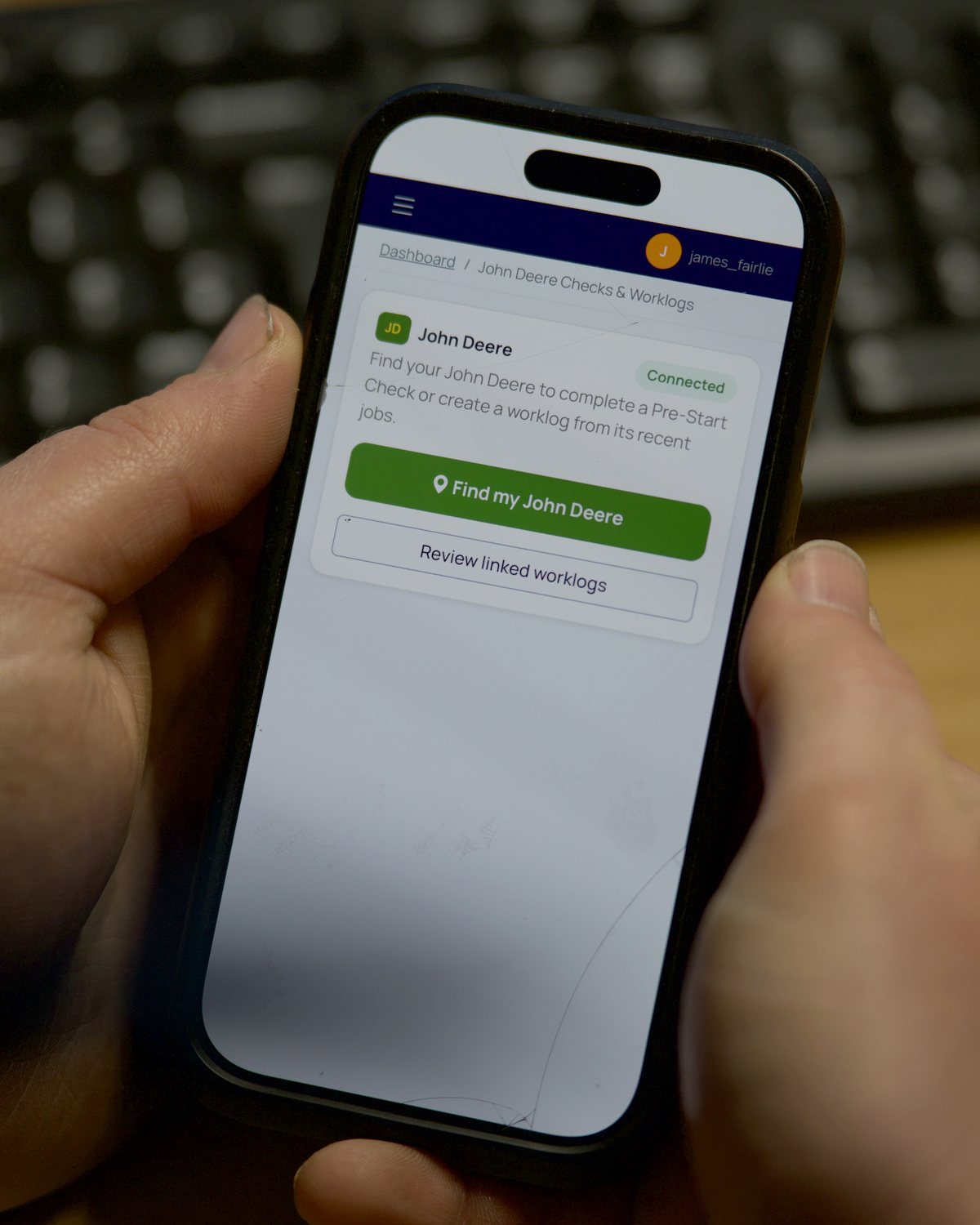
At the end of a job, operators pick the machine they were in. Yokit lists the latest jobs John Deere has recorded for that machine, and they choose one to fill in the worklog. The field, job type, machine and times are filled in, with crop and area where John Deere has them. They check it, add anything missing and submit it to the farm manager.
The office receives the worklog
Once the worklog is approved, the detail flows into jobs, costs, invoices and reports, all within Yokit.
What comes across from John Deere
Farms and fields
Your farms and fields come into Yokit. You choose which farms are yours and which belong to clients.
Machines and implements
Tractors go on your machinery list, and implements such as drills and sprayers go with them.
Clients
Your John Deere clients are added to Yokit, so their work is ready to cost and invoice.
Products
Seed, fertiliser and chemicals come across, ready to link to the jobs they were used on.
Job types
Seeding, tillage, application and harvest are set up as job types for you.
Field jobs
Jobs your machines recorded in the last 45 days come in first. New jobs follow as John Deere records them.
Benefits of using this integration
Data entry once
Connecting Yokit to John Deere Operations Center cuts the time operators spend entering data into your own office systems.
Analyse the true cost
Data captured in Operations Center flows into Yokit, ready to use in worklogs, job costing, invoicing or general data analysis.
Don’t lose track of work already done
Field, crop, product used and time worked flow into a Yokit worklog every time a job is completed, so only the right information enters the system.
Keep more of what you’ve earned
Account for every penny earned and bill with confidence and visibility.
HR, maintenance and safety
Use Yokit’s other features, such as pre-start checks, the holiday tracker and machinery maintenance alerts, to keep your team safe and your machinery running at crucial points through the season.
Reduce the mental administrative burden
Yokit automatically tracks and stores your business’s operational information, easing the mental load of running a busy, high-pressure farm.
How a John Deere worklog works
Connect once
The farm owner connects Yokit to John Deere Operations Center and picks the organisation to use.
Pick the machine
On their phone, the operator picks the John Deere machine they used. The nearest machines are shown first.
Pick the job
Yokit lists the recent jobs that machine recorded. They pick one job, or several.
Check and submit
The worklog fills in from what John Deere recorded, such as the field, crop, job type and area. The operator checks it, adds anything missing and submits.
John Deere in Track. Automate. Intelligence.
Track.
Automate.
Intelligence.
For farms and contractors
For farmers
- Worklogs from the jobs your tractors record
- If John Deere doesn’t name the crop, pick it from your own list
- If you use pre-start checks, the latest one for that machine is linked to the worklog
For agri contractors
- Client farms and fields kept apart from your own
- Link each team member to their John Deere operator
- Products used on the job go on the worklog
What you need
A John Deere Operations Center account, with Yokit given access to your organisation. Ask us and we’ll switch the connection on for your account.
John Deere and Operations Center are trademarks of Deere & Company.
Explore the rest of Yokit
Let's get started
Spend less time on admin, more time on the work that matters.